|
|
 |
| BRASTEXT (SMS) |
Want to send short messages (SMS) to mobile phones overseas?
Brastel can deliver them for you!
Send messages to one of the two groups of countries:
|
|
|
|
Cameroon, Hong Kong, Kenya,
Indonesia, Malaysia, Mongolia, Nigeria,
Singapore, South Africa, Sri Lanka,
Thailand, Uganda, Vietnam, Philippines
|
|
|
IMPORTANT:
To send messages to countries of different groups, the procedure must be done separately. Messages purchased for one group cannot be used or transferred to another group.
|
|
| GROUP B - HOW TO REGISTER |
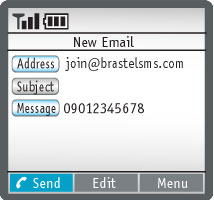 |
Write an email to
(leave "Subject" in blank).
In "Message", enter the mobile phone number registered to your Brastel Smart Phonecard.
Press the  button. button.
You will soon receive an email confirming the registration. |
|
| HOW TO PURCHASE MESSAGES |
|
|
| HOW TO SEND |
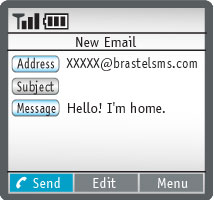 |
Enter the destination mobile phone number, followed by the address:
(leave "Subject" in blank)
Type your message (alphanumeric characters only).
Press the button. |
| To cancel your registration, send an email to
(leave "Subject" in blank) entering your registered mobile phone number in "Message". All remaining messages will be deleted. |
|
| HOW TO REPLY |
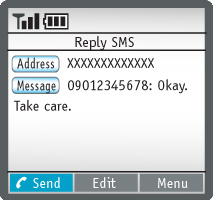 |
Press the "Reply" button (leave "Subject" in blank).
In "Message", the recipient at destination must enter the phone number registered to the Brastext service (without Japan’s country code), colon and the text:
[Japan mobile phone number]: [message]
Charges will be billed by the mobile phone company at destination to the replier as local SMS for messages sent from Indonesia and as international SMS for messages sent from other countries. |
|
| HOW TO CHECK THE BALANCE |
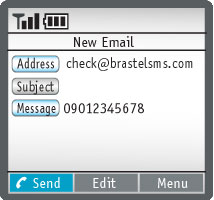 |
Write an email to
(leave "Subject" in blank).
In "Message", enter the mobile phone number registered to your Brastel Smart Phonecard.
Press the button.
You will soon receive an email confirming your current balance. |
|
| HOW TO CHANGE THE EMAIL ADDRESS OR THE MOBILE PHONE NUMBER |
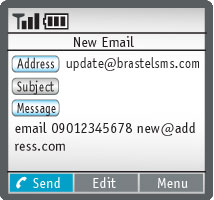 |
If you want to change your email address, send an email to
(leave "Subject" in blank).
This email has to be sent from your 'old' email address (that is, before you change it).
In "Message", enter the word "email", space, your mobile phone number, space and your new email address:
email{space}[your mobile phone number]{space}[your new email address]
Press the button. |
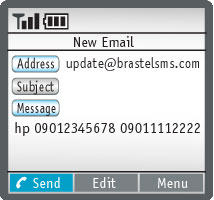 |
To change your mobile phone number, send an email to
(leave "Subject" in blank).
In "Message", enter the word "hp" in lower case, space, your current mobile phone number, space and your new mobile phone number:
hp{space}[old mobile phone number]{space}[new mobile phone number]
Press the button. |
|
| IMPORTANT |
- You must be registered for internet/email services on your mobile phone in order to use the Brastext services.
- Make sure your phone can receive emails from "brastext.jp" (for Group A countries) and/or "brastelsms.com" (for Group B countries) domains.
- Your mobile phone company may charge you for every email sent to "brastext.jp" and "brastelsms.com".
- To buy messages, your Brastel Smart Phonecard must have enough credit.
- Purchased messages are not refundable.
- Service contents, including rates, are subject to change without prior notice.
- All messages will expire six months after the date of purchase.
- The standard SMS length is 160 alphanumeric characters; however, messages may be divided and charged as two or more. Depending on the mobile phone/provider configuration, the division may also occur at the destination. Furthermore, when sending a SMS to Group B, your phone number will be included in the text and deducted from the 160 characters, leaving 145 characters to be written in your message.
- Brastext service only supports plain text messages. Any image or movie files will be converted to text and charged according to the number of characters.
- The service may be temporarily suspended for maintenance without prior notice.
- Sending and receiving messages (SMS) could take an indefinite period of time depending on the trasmission networks.
- Brastel will not be able to offer customer support if the SMS cannot be replied due to technical problems at the destination.
- We may not be able to deliver messages depending on the mobile phone company at destination. Please see the list below.
For further information, please call Customer Service.
| Brastext - Country List (Group B) |
| Destination Country |
Mobile Phone Company |
| Cameroon |
MTN Cameroon Ltd. |
|
| Hong Kong |
CSL |
Hutchison Orange |
| Indonesia |
Excelcomindo |
Mobile - 8 |
| Indosat (Satelindo) |
Telkomsel |
| Indosat - M3 |
Telkom Flexi |
| Esia |
|
| Kenya |
Safaricom* |
|
| Malaysia |
Maxis |
Celcom |
| Digitelecom |
|
| Mongolia |
Mobicom Corp. |
|
| Philippines |
Smart |
Globe |
| South Africa |
MTN* |
|
| Singapore |
SingTel |
MobileOne |
| Nigeria |
MTN Nigeria* |
Globalcom* |
| Vmobile* |
|
| Sri Lanka |
Dialog GSM |
|
| Thailand |
AIS (Advance Info Service PLC) |
True Corporation |
| Uganda |
Celtel |
|
| Vietnam |
Vinafone |
|
* Available for sending only.
|
|
|
|
|


